Free · no signup · what you enter stays in your browser. To pick up where you left off, check “Keep on this device” in the editor.
Every card is made from your seating chart as it is now, so each one carries the guest’s current table.
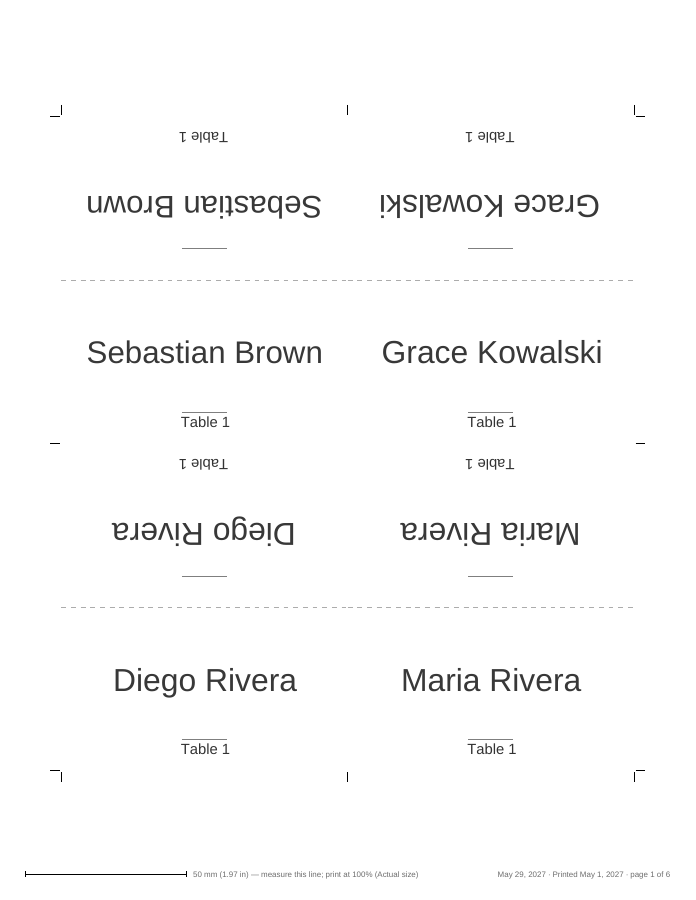
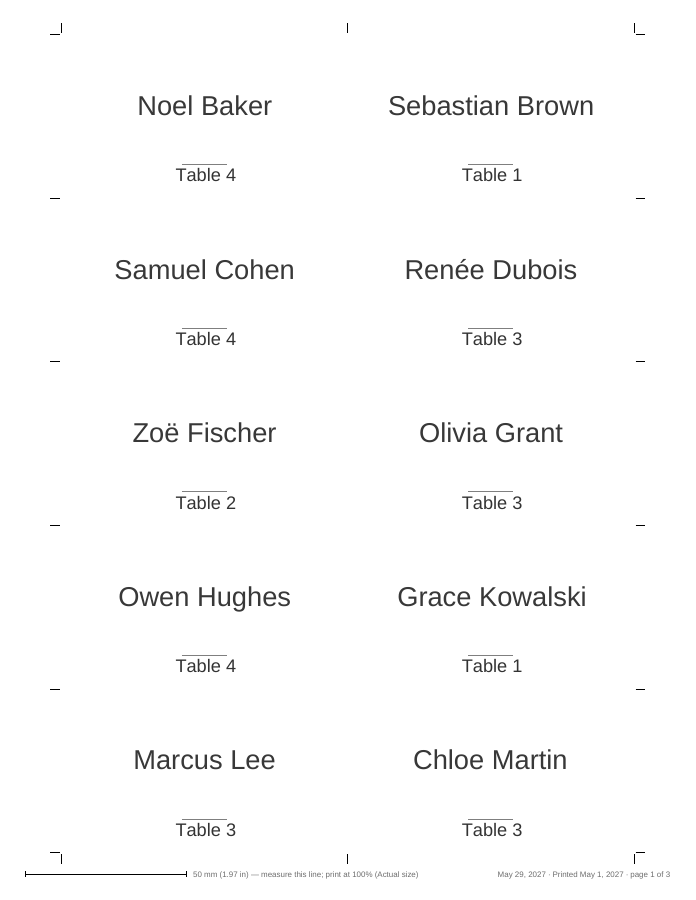
Page 1 of sample PDFs made with the editor from a made-up guest list (US Letter).
How to use it
Finish the seating chart first, so every card knows its table.
Choose Place cards (tent or flat, the table on or off, the meal choice only if you check it) or Escort cards
(name and table, for a table near the entrance).
Pick the paper (Letter, A4, A5, A3, Legal or Tabloid) and the card size, standard or large. Cards are laid out with
cut marks, inside a margin that home printers can reach.
Read Before you print: unnamed guests, attending guests without a table, seats of guests who declined, names
that are too long and names printed as an image are listed there.
Print at actual size, or download a PDF for a print shop.
Worked example
40 accepted guests, of whom 38 need a seat (two infants sit on a parent’s lap). Everyone who needs a seat has a table,
and one plus-one has no name yet.
Cards: 38, one per seated guest. The infants have no seat, so they get no card.
As tent cards, 4 fit on a Letter sheet, so 38 cards take 10 sheets, the last one holding 2. As flat cards,
10 fit on a sheet (2 across, 5 down): 4 sheets, the last holding 8.
The unnamed plus-one prints as “Guest of Sam Lee” and is listed under Before you print.
After printing, you type the plus-one’s name and move one guest to another table. The Print kit says “Place cards:
2 new or changed, 0 no longer needed”, and “Print only the new or changed cards (2 of 38)” gives you one sheet with
just those two.
By default every accepted guest who has a table. For place cards you can choose “Everyone attending” instead, which adds accepted guests who need a seat but have no table yet (their card has no table line). Guests marked as needing no seat, such as an infant on a lap, get no card. An unnamed plus-one prints as “Guest of [host]”.
What is printed on a card?
An escort card shows the guest’s name and table. A place card shows the name and, unless you uncheck “Show the table on the card”, the table. The meal choice is added to place cards only when you check “Include the meal choice”; anyone at the table can read it. Contact details, dietary notes and private notes are never printed on cards.
Tent cards or flat cards?
Place cards start as tent cards: 3.5 × 2 in when folded (3.5 × 4 in unfolded), 4 per Letter or A4 sheet, with a dashed fold line and the name on both sides so it reads from either side of the table. Flat cards are 3.5 × 2 in, 10 per sheet, for a holder or the plate. The large size, 4.25 × 2.75 in, suits long names. Escort cards are always flat.
What order are the cards printed in?
Place cards print by table, then by name, so you can set them out one table at a time. Escort cards print A–Z by last name, the order they are laid out at the entrance. Both can be switched under “Order of the cards”.
I changed the plan after printing. Do I have to reprint everything?
No. After a PDF or print, the Print kit remembers what was on each card (as short codes, not the names). After a change it says, for example, “Place cards: 2 new or changed, 1 no longer needed” and offers “Print only the new or changed cards (2 of 38)”. Set aside the cards that are no longer needed.
A name is too long for the card. Is it shrunk?
Only down to a readable minimum of 14 pt. A longer name wraps onto a second line. If it still does not fit, it is printed at 14 pt and listed under “Before you print” as too long, so you can shorten the name on cards or choose the large size.
How are names in other alphabets printed?
Names in Latin alphabets, accents included (José, Müller, Łukasz, Dvořák, Nguyễn), and in Greek and Cyrillic (Ελένη, Ольга) are printed as real text. Names in Chinese, Japanese, Korean, Thai and some other scripts are drawn by your browser’s own fonts as a sharp image in the same place, and are listed under “Before you print” so you can check them.
Why do my cards come out the wrong size?
Print at 100% (“Actual size”) with “Fit to page” turned off, and measure the 50 mm calibration line on the sheet. The actual-size printing guide explains the printer settings.
Is there a watermark or a logo on the cards?
No. A sheet holds your cards, cut marks, the calibration line and, in the margin you cut away, a small gray footer line with the event name and the page number.