Free · no signup · what you enter stays in your browser. To pick up where you left off, check “Keep on this device” in the editor.
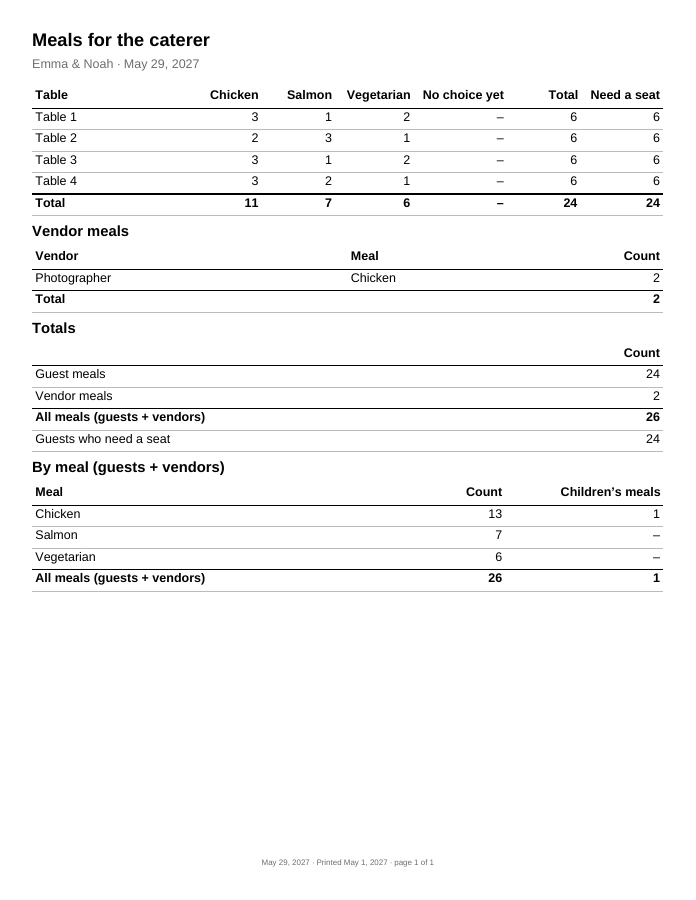
The caterer sheet answers what your caterer asks for: how many of each meal, at which table, how many vendor meals, and how many guests still have no choice. It counts only accepted guests who need a meal, from the replies and meal choices in your guest list.
Page 1 of a sample PDF made with the editor from a made-up guest list (US Letter).
How to use it
Set up the meal choices and vendor meals in Import & backup → Settings, and pick each guest’s meal in the
guest list. Two spellings of one meal (“Veg” and “Vegetarian”) can be merged there.
Seat guests in the seating chart, so meals can be counted per table.
Check the No choice yet column and follow up with those guests.
Check Add pages with each guest’s name and meal only if the caterer needs names.
Print the sheet or download a PDF for your caterer.
Worked example
10 guests have accepted. One is an infant who needs neither a seat nor a meal, and one guest leaves after the ceremony
and needs no meal. That leaves 8 guest meals over two tables. The first page of the sheet reads:
Table
Chicken
Vegetarian
No choice yet
Total
Table 1
3
1
–
4
Table 2
2
1
1
4
Total
5
2
1
8
Below it, the vendor meals (photographer and DJ, both vegetarian: 2) and the totals: 8 guest meals, 2 vendor meals,
10 meals in all, or by meal 5 chicken, 4 vegetarian and 1 with no choice yet. The guest count stays 10, because
vendors are not guests.
Not by default. The summary shows tables and meal counts only. If your caterer wants a list by name (to serve the right plate to the right seat), check “Add pages with each guest’s name and meal”: the sheet then gets extra pages with table, name and meal choice. Contact details are never on it.
How do I give the caterer allergy details?
Turn on dietary notes for the list (Import & backup → Settings), add the notes in each guest’s Edit form, then check the detail pages and “Include dietary notes (sensitive)”. Every detail page then starts with “Confidential — for your caterer only”, and within each table the guests with a note come first. Give that file only to your caterer.
Are vendor meals counted as guests?
No. Vendor meals (photographer, band, planner) are added in Import & backup → Settings. On the sheet they have their own section, and the totals show guest meals, vendor meals and all meals separately. The guest count does not change.
What about guests who have not chosen a meal?
They are counted in the “No choice yet” column of their table, so you can chase them before the caterer’s deadline instead of discovering the gap on the day.
Do guests who have not replied count?
No. Only accepted guests who need a meal are on the caterer sheet; guests with no reply yet are not on it at all. The “No reply yet” count at the top of the workspace shows how much the numbers may still change.
What about accepted guests who have no table yet?
They are still counted, on a “No table yet” row after the tables, so the totals are right before the seating chart is finished.
Why do some cells show “–” instead of 0?
An empty cell prints “–”, so the counts that matter stand out when the kitchen reads the sheet. The Total column and the totals below the table always show a number.
The plan changed after I sent the sheet. How do I tell?
Every page shows the date it was printed in its small gray footer, and the Print kit tells you when your list has changed since your last PDF or print of the sheet. Make it again, send the new PDF and ask the caterer to throw away the old one.
Are meal choices and dietary notes stored anywhere?
Only in your browser, and only after you check “Keep on this device”. The PDF you download is a file on your device: share it only with your caterer.